WooCommerce Google Sheets stock sync in real time
WooCommerce Google Sheets stock sync made simple: update product stock directly from Google Sheets, push sales back to your sheet in real time, build products from sheet data, and use AI to draft product content faster.
Stock Sync Sheets is built for WooCommerce stores that want a simple spreadsheet workflow first — with stronger tools underneath when they need Dry Run, Manual Review, Product Builder, AI Review, schedules, Sheet Push, and Push on Sale.
- ✔Update WooCommerce stock directly from Google Sheets
- ✔Push WooCommerce sales back to Google Sheets in real time
- ✔Create and update products from mapped sheet data
- ✔Use AI to draft product descriptions, bullets, and SEO fields
- ✔Preview changes with Dry Run before live updates
- ✔Review uncertain matches before they affect products
How WooCommerce Google Sheets stock sync works
The core workflow is simple. Connect your sheet, map your fields, preview changes, then sync stock or build products when ready.
Connect Google Sheets
Add your Google Sheet, tab name, row range, and the columns used for stock, SKU, product ID, model code, or product data.
Preview before syncing
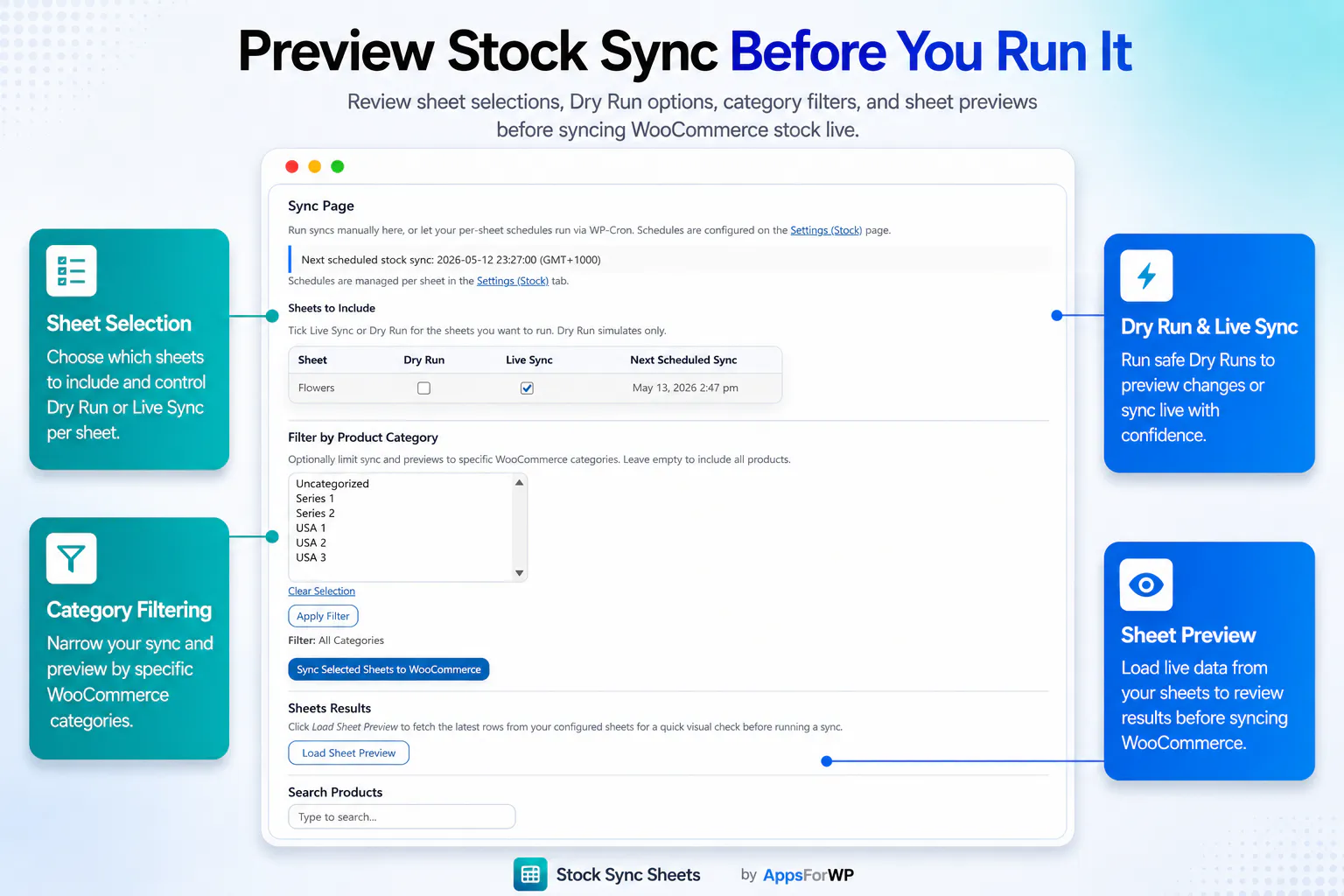
Run a Dry Run or Sheet Preview to see what the plugin found before updating live WooCommerce products.
Sync stock or build products
Update WooCommerce stock, create products, update products, or stage AI content drafts from your mapped sheet rows.
Keep your sheet current
Use Push on Sale so WooCommerce sales can update your Google Sheet in real time after stock is reduced.
WooCommerce stock sync from Google Sheets, built for real store workflows
WooCommerce includes built-in stock management, but many stores still manage supplier stock, warehouse quantities, product planning, or shared inventory in Google Sheets. Stock Sync Sheets connects that spreadsheet workflow with WooCommerce so stock updates can be reviewed, matched, and applied more safely.
Instead of copying quantities from a spreadsheet into WooCommerce by hand, store owners can run a Dry Run, review uncertain matches, confirm correct products, ignore rows that should not sync, and then apply approved stock changes when the preview looks right.
This makes Stock Sync Sheets useful for stores using Google Sheets as a supplier stock list, stock control sheet, warehouse reference, product planning file, or shared inventory source.
- ✔Connect spreadsheet-based stock management with WooCommerce products
- ✔Use Dry Run and Manual Review before live stock changes
- ✔Keep confirmed matches for cleaner future syncs
- ✔Push WooCommerce sale stock changes back to Google Sheets in real time
Update product stock directly from Google Sheets
Stock Sync Sheets lets WooCommerce stores use Google Sheets as a practical stock source instead of manually editing products one by one.
- ✔Sync stock quantities from Google Sheets to WooCommerce
- ✔Update stock status based on your sheet values
- ✔Use SKU, product ID, model code, product name, or mapped fields
- ✔Configure multiple sheets, suppliers, tabs, and row ranges
- ✔Run manual syncs or scheduled syncs
Real-time Push on Sale keeps your sheet updated after orders
Basic stock sync tools usually pull data one way: Google Sheets to WooCommerce. Stock Sync Sheets also supports the reverse workflow.
When a WooCommerce sale reduces stock, Push on Sale can update your Google Sheet in real time, keeping your shared stock source fresher and reducing the need for manual sheet edits after orders.
- ✔Real-time sale-to-sheet stock updates
- ✔Better shared inventory workflow
- ✔Useful for multi-store and supplier-sheet setups
- ✔Helps stop your sheet becoming stale after WooCommerce orders
Product Builder is stronger than basic bulk editing
Product Builder helps you create, update, preview, and review WooCommerce products from mapped Google Sheet data. It is built for real catalog workflows, not just changing one field at a time.
Create and update products
Use Google Sheet rows to create new products or update existing products using SKU, product ID, parent fields, and mapped product data.
Variable and variation workflows
Work with simple products, variable products, variation rows, grouped products, external products, virtual products, and downloadable product data.
Images and catalog fields
Map product names, descriptions, categories, tags, attributes, featured images, gallery images, stock fields, status, dimensions, and more.
Preview before importing
Use preview and review workflows before product data is written to WooCommerce, reducing blind imports and avoidable mistakes.
Use AI to save hours on product content and SEO
Product Builder AI can draft product content and SEO fields from your mapped sheet data. Drafts are staged for review first, so AI does not automatically overwrite live product content.
AI is bring-your-own-key. We do not resell AI credits.
Customers use their own OpenAI API key. Stock Sync Sheets does not sell AI credits, does not add usage markup, and does not take commission from AI usage.
Product content drafts
Generate product titles, short descriptions, long descriptions, and customer-facing bullet features from sheet data.
SEO field drafts
Draft SEO titles, meta descriptions, and focus keyphrases for review before importing approved content.
Review before import
AI drafts are staged in AI Review first, giving you a chance to inspect and approve content before WooCommerce is updated.
No automatic overwrite
The workflow is built around review and approval, not blind replacement of live product content.
Watch Stock Sync Sheets in action
A quick walkthrough helps buyers understand the plugin before they purchase, set up a store, or test the demo.
See the full workflow before you buy
Watch how the plugin fits together across Stock Sync, Dashboard, Product Builder, AI Review, Sheet Push, and Push on Sale.
- ✔See the main plugin pages quickly
- ✔Understand what is included in the core plugin
- ✔Get a better feel for setup before reading the full guides
What Stock Sync Sheets includes
The main plugin includes the core WooCommerce Google Sheets workflow. Price Sync is the only separate add-on.
Stock Sync
Sync WooCommerce stock quantities and stock status from Google Sheets using your configured matching fields and row ranges.
Push on Sale
Update Google Sheets in real time when WooCommerce sales reduce stock, keeping your shared sheet source fresher.
Product Builder
Create or update WooCommerce products from mapped Google Sheet fields, including product types, images, categories, attributes, and more.
AI Review
Use optional AI assistance to stage product content and SEO drafts before approving and importing into WooCommerce.
Dry Run
Preview likely stock changes before live updates so you can check results before touching WooCommerce products.
Manual Review
Review uncertain matches, search WooCommerce products, confirm correct matches, and reduce bad updates.
Confirmed Matches
Save approved product matches so future syncs become faster, cleaner, and easier to manage.
Ignored and Blacklist Controls
Ignore rows that should not auto-match and blacklist bad product pairs so the same mistake does not repeat.
Sheet Push
Push WooCommerce stock and product-related data back to Google Sheets using full export or incremental push workflows.
Scheduled Syncs
Run stock updates automatically on schedule so your WooCommerce store stays closer to your latest sheet data.
Dashboard
Check module status, schedules, pending manual review, confirmed matches, ignored items, blacklists, and workflow links from one place.
Price Sync Add-On
Regular and sale price syncing is available through the separate Price Sync Add-On for dedicated price workflows.
Core capabilities at a glance
Stock Sync Sheets is designed to cover much more of the real Google Sheets to WooCommerce workflow than a basic stock importer.
| Workflow | What it does |
|---|---|
| WooCommerce Google Sheets stock sync | Updates WooCommerce stock quantity and stock status from one or more Google Sheets. |
| Real-time Push on Sale | Updates Google Sheets when WooCommerce sales reduce stock, keeping your shared sheet stock source current faster. |
| Dry Run | Shows likely changes before live updates are applied. |
| Manual Review | Lets you approve uncertain product matches before syncing live. |
| Confirmed Matches | Saves approved matches so future syncs are cleaner and faster. |
| Product Builder | Creates or updates WooCommerce products from mapped Google Sheet data. |
| Product Builder AI | Drafts product descriptions, bullet features, SEO titles, meta descriptions, and focus keyphrases for review. |
| Sheet Push | Sends WooCommerce data back to Google Sheets using full export or incremental push workflows. |
| Scheduled Syncs | Runs stock updates automatically based on your configured schedule. |
Built for real WooCommerce store workflows
This is for stores that already rely on spreadsheets and need WooCommerce to work with that process instead of fighting it.
Supplier-driven stores
Useful when stock or product data comes from suppliers, warehouses, internal teams, or spreadsheet-based systems.
High-SKU WooCommerce shops
Reduce product-by-product manual editing when you manage many products or frequent stock changes.
Multi-store stock workflows
Use one shared Google Sheet as a stock source and keep connected workflows working from fresher values.
No-code merchants
Use WooCommerce and Google Sheets together without needing a custom development project or heavyweight inventory system.
Simple pricing
Stock Sync Sheets includes the core Google Sheets workflow for WooCommerce: stock sync, real-time Push on Sale, Product Builder, AI Review, Sheet Push, Dry Run, Manual Review, Confirmed Matches, Ignored items, Blacklist controls, schedules, logs, and Dashboard.
1-Year License
12 months of updates and support, plus a 30-day money-back guarantee.
Buy on WooCommerce.com2-Year License
Longer coverage for stores planning ongoing use of the Google Sheets workflow.
Buy on WooCommerce.comHelpful WooCommerce Google Sheets resources
These pages explain the main workflows in more detail so buyers, store owners, and AI search tools can understand exactly where Stock Sync Sheets fits.
WooCommerce Google Sheets Stock Sync Plugin
See the main buyer guide for Stock Sync Sheets, including Dry Run, Manual Review, confirmed matches, Product Builder, AI Review, schedules, and Push on Sale.
Stock Sync Sheets Guides
Use the dedicated guide hub to learn setup, stock sync, settings, confirmed matches, ignored lists, blacklists, Sheet Push, Price Sync, and Product Builder workflows.
Stock Sync
Learn how WooCommerce stock sync from Google Sheets works, including Dry Run, Manual Review, confirmed matches, ignored rows, schedules, and logs.
Best WooCommerce Google Sheets Stock Sync Plugin
Compare stock sync workflows and learn what to look for before choosing a WooCommerce Google Sheets stock sync plugin.
FlexStock Alternative
Compare Stock Sync Sheets as a FlexStock alternative for WooCommerce stores that need Google Sheets stock sync, Push on Sale, Dry Run, Manual Review, and Product Builder workflows.
WooCommerce Stock Sync Plugin Comparison
Compare WooCommerce stock sync plugin workflows by safety, matching, previews, review controls, Google Sheets support, and store-management features.
Google Sheets to WooCommerce Stock Sync
Learn the practical workflow for taking stock data from Google Sheets and syncing it into WooCommerce without manually editing every product.
WooCommerce Inventory Sync with Google Sheets
See how Google Sheets can support WooCommerce inventory sync when your stock data comes from suppliers, warehouses, or shared internal sheets.
WooCommerce Stock Management with Google Sheets
Learn how Google Sheets can support WooCommerce stock management with Dry Run, Manual Review, confirmed matches, schedules, logs, and safer updates.
WooCommerce Bulk Stock Update from Google Sheets
Learn how bulk stock updates can be handled from a spreadsheet workflow with previews, matching controls, and safer update steps.
WooCommerce Stock Import with Dry Run
Understand why Dry Run matters before importing stock changes, especially when using supplier sheets, large catalogs, or new mappings.
WooCommerce Stock Sync with Manual Review
See how Manual Review helps prevent bad product matches by letting you inspect uncertain rows before live WooCommerce stock is updated.
Supplier Stock Sheets to WooCommerce
Learn how supplier stock sheets can feed WooCommerce stock workflows when your product availability comes from external spreadsheet data.
Multi-Store WooCommerce Inventory with Google Sheets
Use Google Sheets as a shared inventory source for stores or teams that need stock values visible outside one WooCommerce admin screen.
WooCommerce AI Product Description Generator
See how Product Builder AI can draft WooCommerce product titles, descriptions, short descriptions, and bullet features from mapped sheet data.
WooCommerce AI SEO Product Fields
Learn how AI-assisted SEO drafts can help prepare SEO titles, meta descriptions, and focus keyphrases before approval and import.
Create Variable Products from Google Sheets for WooCommerce
Learn how mapped sheet rows can support variable product and variation workflows when building or updating WooCommerce catalogs.
WooCommerce Google Sheets REST API Alternative
See when a custom REST API build makes sense, and when a no-code WooCommerce Google Sheets workflow is safer and easier to manage.
WooCommerce Stock Sync Without Coding
Learn how store owners can connect WooCommerce stock and Google Sheets without building a custom integration from scratch.
Sheet Push and Push on Sale
See how WooCommerce stock and product data can be sent back to Google Sheets, including real-time sale-to-sheet updates.
Push WooCommerce Sales to Google Sheets
Learn how Push on Sale can update Google Sheets when WooCommerce orders reduce stock, helping shared stock sheets stay fresher after sales.
Product Builder
Use mapped Google Sheet rows to create or update WooCommerce products, including variable products, images, attributes, and catalog fields.
Setup Videos and General Guides
Watch setup videos and read the step-by-step guides before connecting your own WooCommerce store and Google Sheets workflow.
Stock Sync Sheets FAQs
What does Stock Sync Sheets do?
Stock Sync Sheets helps WooCommerce stores update stock from Google Sheets, push sales back to Google Sheets in real time, build products from mapped sheet data, and use optional AI to draft product content and SEO fields.
Can I update WooCommerce stock directly from Google Sheets?
Yes. You can map your sheet fields and sync stock quantities and stock status from Google Sheets into WooCommerce.
How is this different from WooCommerce stock management by itself?
WooCommerce includes stock management inside product editing screens. Stock Sync Sheets adds a Google Sheets workflow for stores that manage supplier stock, warehouse stock, catalog data, or shared inventory outside WooCommerce.
Do I need to build against the WooCommerce REST API?
No. The plugin gives store owners an admin workflow for matching sheet rows to WooCommerce products, previewing stock updates, reviewing uncertain matches, and applying approved changes without building a custom REST API integration.
Can I use supplier sheets or warehouse stock sheets?
Yes. You can configure sheet tabs, row ranges, and mapped columns so supplier or warehouse stock data can be reviewed and synced into WooCommerce.
What does real-time Push on Sale mean?
When WooCommerce stock is reduced by a sale, Push on Sale can update your Google Sheet in real time so the sheet reflects the sale faster.
Can I preview changes before live sync?
Yes. Dry Run lets you preview likely stock changes before updating live WooCommerce products.
What happens if a product match is uncertain?
Uncertain matches can go to Manual Review so you can choose the correct WooCommerce product before updates are applied.
Can I create or update products from Google Sheets?
Yes. Product Builder can create or update products from mapped sheet data, including simple, variable, variation, grouped, external, virtual, and downloadable product workflows.
What does Product Builder AI do?
Product Builder AI can draft product titles, short descriptions, long descriptions, bullet features, SEO titles, meta descriptions, and focus keyphrases for review before import.
Do you charge extra for AI usage?
No. Customers use their own OpenAI API key. Stock Sync Sheets does not sell AI credits, add markup, or take commission from AI usage.
Is Price Sync included?
No. Price Sync is handled by the separate Price Sync Add-On for stores that want to sync regular prices and sale prices from Google Sheets.
Connect WooCommerce and Google Sheets without making stock management harder
Use Stock Sync Sheets to update product stock directly from Google Sheets, push sales back in real time, build products from sheet data, and use AI to draft product content faster.